
- Identification between installed agents and your account.
- Storing database credentials to be used when configuring a pipeline’s source.
- Storing source credentials for use in connectors.
Secret manager flow in Maia
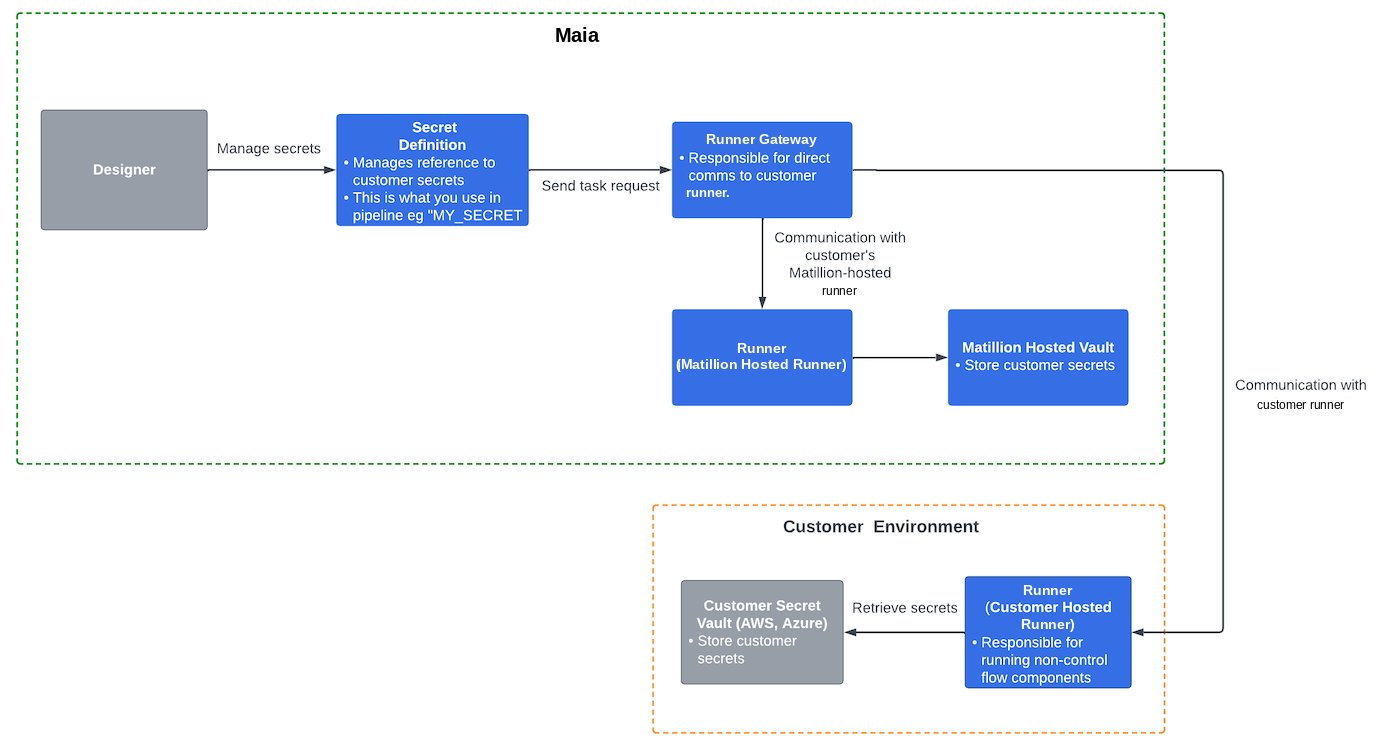
- Users authenticate themselves to access —where secrets, including customer references, are managed securely.
- Users invoke to create and configure data pipelines and to define secrets for an existing cloud provider’s secret within the corresponding secret definition.
- Task requests are sent to the Agent Gateway for direct communication with customer-hosted agents, and the scheduler coordinates pipeline executions based on schedules and triggers.
- A Matillion-hosted securely stores and retrieves customer secrets from the Matillion-hosted vault as necessary for pipeline execution.
- Customer secret vaults securely store and retrieve customer secrets. A customer-hosted provides the option to execute data pipelines on-premises or in the customer’s cloud network.
Security benefits
- never directly stores passwords or keys, relying instead on your cloud provider for secure storage.
- Your cloud provider’s secret manager offers robust security measures for protecting credentials, ensuring the confidentiality and integrity of sensitive information.
Agents
The is responsible for processing pipeline tasks, which are individual units of work within a data integration workflow. These tasks handle data integration and transformation operations by securely connecting to data sources and targets. The can be configured in two ways:- Full SaaS: Fully managed by Matillion and resides in Matillion’s VPC.
- Hybrid SaaS: Runs inside a user’s VPC.
s can access stored secrets, which serve as the repository for all your secrets. In your projects, information is limited to the names of agents and the secrets they can access. doesn’t provide direct access to the values of secrets. However, these secrets can be used within your projects to access your data services.
Using secrets
In , secrets and secret definitions are stored at the project level. To use a secret:- Create a named secret in your cloud provider’s secret manager.
- Add the secret name to the secrets stored in . Doing this stores only the name and location of the secret, not the secret’s actual value.
- Call the secret by name when you need to use the credentials—for example in a data source connector. The secret name is resolved at runtime to obtain the credentials stored in the secret key.
If you need to store multiple passwords and keys, each should be in a separate, named secret.