This feature is only available to customers on specific Maia plans. Visit the Maia Pricing page to learn more.
To migrate a project’s Git repository to a different repository or Git provider without recreating the project, use the Repository Migration API.
Supported providers
Aside from a Maia-hosted Git offering, the external Git providers that are currently able to be connected to Maia are as follows:GitHub
See how to Install the Maia app for GitHub. When installing the Maia app for GitHub, you must grant read and write access to repository contents (commits, branches, releases, and merges) and GitHub Actions workflow files (.github/workflows/). These permissions enable Maia to manage repositories and update workflows in your repository.
If you run into issues, read Troubleshooting GitHub repository errors.
Azure DevOps
Instructions for Installing the Maia app for Azure DevOps. If you run into issues, read Troubleshooting Azure DevOps repository errors.GitLab
Connecting GitLab to Maia is a straightforward process. Read about the prerequisites to get started. If you run into issues, read Troubleshooting GitLab repository errors.Bitbucket
Likewise, it is a simple process for connecting Bitbucket to Maia. Ensure you’re ready to go by reading the prerequisites here. If you run into issues, read Troubleshooting Bitbucket repository errors.Allowing IPs
You may need to allow IP addresses for Maia. Make sure the Hybrid SaaS Maia runners and Git repositories IP addresses are allowed on your repository if applicable.How we connect to the Git provider
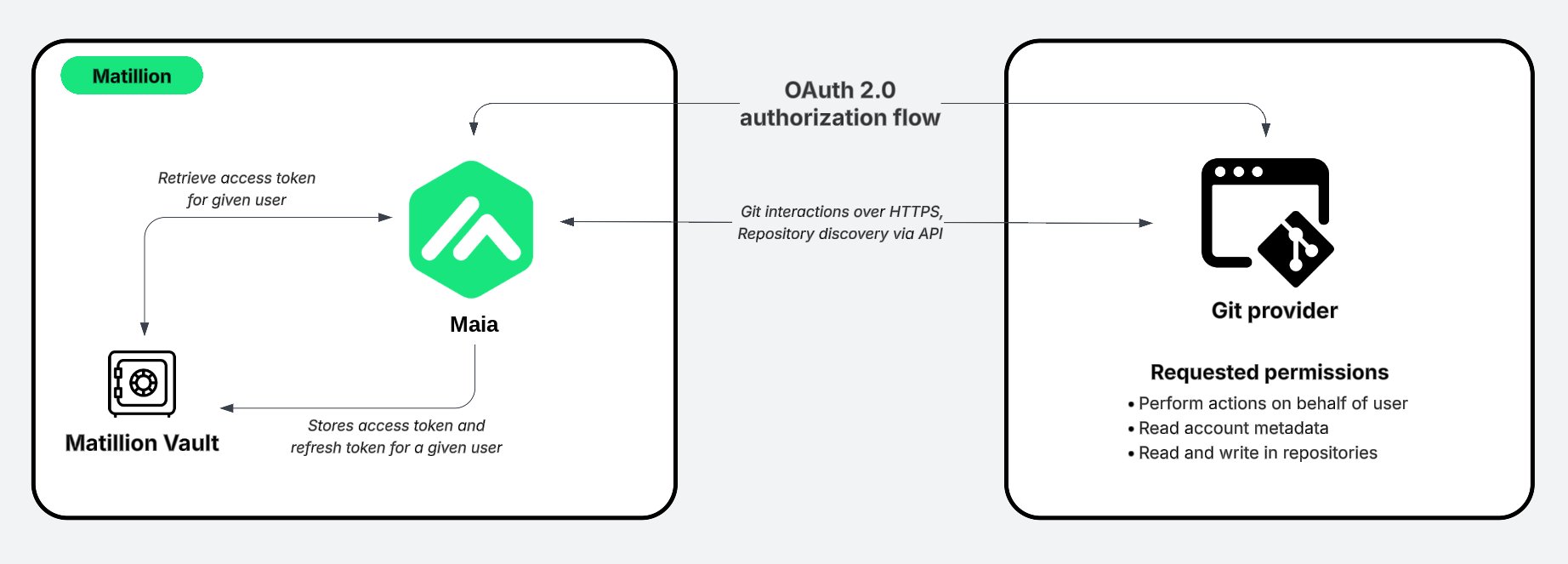
Maia uses OAuth to connect to your Git provider. The app is registered with the scopes needed for Maia to work. The application has permissions to read and write to the repositories and to read account metadata. In addition, the Maia app honors all user permissions set up by your Git admin. For example, if a user doesn’t have access to a repository in an organization, they won’t be able to use that repository in Maia. This is a standard method of connecting to Git providers, and is the recommended approach for security and ease of use. When a user tries to authorize with one of the Git providers, Maia will redirect the user to the Git provider’s OAuth page, which talks directly with the Maia app that is already installed in the user’s account. At any time, the user can revoke access to the Maia app from their Git provider account. We don’t store any sensitive user information. We only store the user access token that is returned from the Git provider and the refresh token. The user access token is used to allow the user to perform day-to-day actions. The refresh token is used to generate a new token when the token expires. The user access token and the refresh token are stored in the Matillion secure vault.