
Prerequisites
To get started, you’ll need:- A account. To register, read Registration.
- Access to AWS, with the permissions to create a stack on a billable account. You may need an administrator from your organization to either give access or perform this process with you.
- Permissions to provision cloud resources in the AWS environment that the source database is running in.
- An IAM role that has suitable permissions for . If you’re using the same IAM role, you might need to add
cloudformation.amazonaws.comto the Service section in the Trust Relationship section of your IAM role to allow the role to work with the ECS service. An example trusted entity can be found below. Read Third-party environment roles and permissions for more information about creating IAM roles.
Created resources
This template will create the following resources in your AWS account:- ECS task definition.
- ECS Fargate cluster.
- CloudWatch Log group.
- An entry in AWS Secrets Manager.
- IAM Roles with permissions for the following:
- Task Roles to your ECS, EC2, and Secrets Manager.
- Task Execution Roles to pull from ECR Public repositories.
Visualization
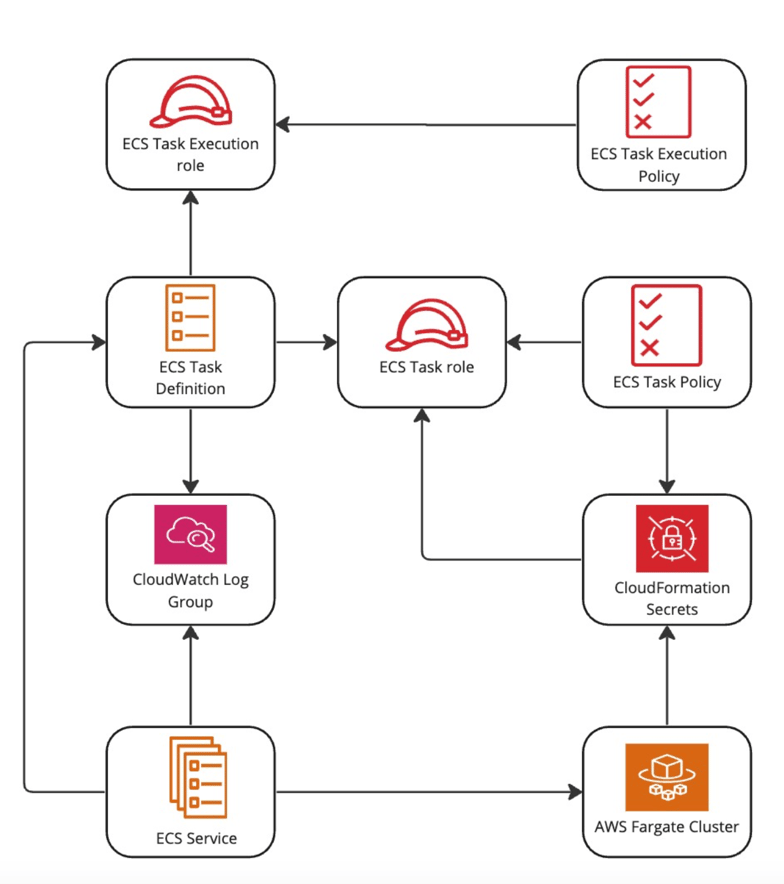
Using the CloudFormation link
- If you haven’t already created the agent in , follow the procedure in Create a .
-
On the Runner details page, note the following Credentials:
client_idandclient secret. - Ensure you are logged in to your AWS account before proceeding.
- Under Install using CloudFormation on the Runner details screen, click Launch. This will launch the CloudFormation stack in the AWS Console with pre-filled values for most parameters.
-
Complete the remaining parameters as follows:
- Stack name: An arbitrary name given to the created stack. This must be unique.
- OAuth Client ID: Copy the
client_idfrom the Runner details page. - OAuth Client Secret: Copy the
client_secretfrom the Runner details page. - VPC Id: Select the ID of an existing VPC. For more information, read VPCs.
- VPC Subnet Ids: Select at least one VPC Subnet to use.
- Database VPC Security Groups: Select at least one security group associated with your databases.
- Ensure that the CPU and RAM allocation is appropriate for the workloads your Streaming pipelines will manage. Read Sizing s for guidance.
- If you intend to use MySQL as a streaming data source, you will need to complete additional configuration under the Optional MySQL Support section. Read Configure the for MySQL for details.
- Click Create stack.