
User authentication
supports a range of authentication and login methods, as detailed below. The following security measures apply regardless of the method used to log in to :- Users must re-authenticate every 10 hours.
- If an account has 10 consecutive failed login attempts, notifies Matillion and, if appropriate, Matillion may lock the account.
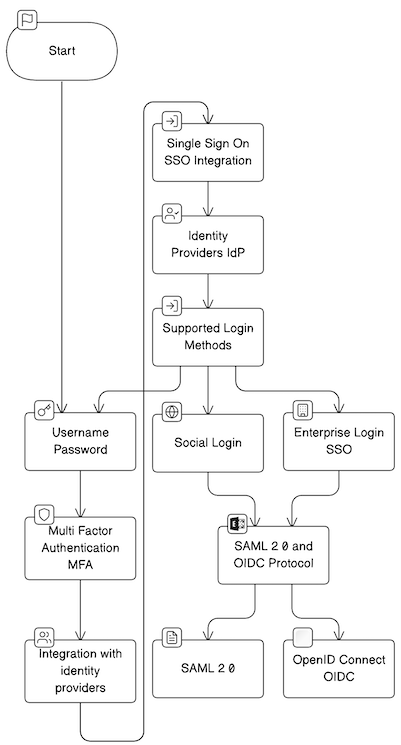
Username/password
supports traditional username/password authentication. Users authenticate by providing their unique username and a secure password.Multi-factor authentication (MFA)
offers multi-factor authentication. Users are required to provide additional verification, such as a one-time code from a mobile app, in addition to their credentials. Enabling this feature is recommended for added security. supports integration with various MFA providers for additional security measures. We highly recommend all users use multi-factor authentication.Integration with identity providers
seamlessly integrates with identity providers such as Okta, supporting both Security Assertion Markup Language (SAML) and OpenID protocols for single sign-on (SSO) functionality. With SSO integration, users can use their existing organizational credentials for authentication, simplifying access to the Matillion platform.Single sign-on (SSO) integration
supports single sign-on (SSO) integration, offering a streamlined approach to user authentication and access management. SSO enhances user experience, security, and administrative efficiency by allowing users to access Matillion using their existing credentials from an identity provider (IdP).Supported login methods
Matillion offers three ways to log in:- Username/password: Traditional username/password authentication method.
- Social login: Users can log in using their Google or Microsoft accounts.
- Custom SSO: Supported by OIDC and SAML protocols via identity providers like Okta, Entra, Keycloak, etc. This feature is only available to customers on specific plans. Visit the Pricing page to learn more.
API token management
uses tokens for API access. Tokens are generated during the authentication and authorization process, where users request an API token using their Client ID and Client Secret. These tokens have a set expiration time to uphold security measures. To maintain a balance between security and usability, the platform offers mechanisms for token renewal or regeneration. These functionalities ensure that users can continue their activities seamlessly while upholding stringent security protocols.Token generation
Users need to request an API token using their Client ID and Client Secret as part of the authentication process, which is detailed in the authentication documentation.Expiration and renewal
Tokens within have a set expiration time to uphold security measures. To maintain a balance between security and usability, the platform offers mechanisms for token renewal or regeneration. These functionalities ensure that users can continue their activities seamlessly while upholding stringent security protocols. You can refer to the documentation for more information.- For users authenticating with and using , ID tokens last for 10 hours.
- For the API, access tokens last for 24 hours.